SSD Test
Measures an SSD's real, sustained write speed after its cache fills up, in the terminal or a desktop app.
Install
curl -fsSL https://raw.githubusercontent.com/openhoangnc/ssd-test/main/run.sh | sh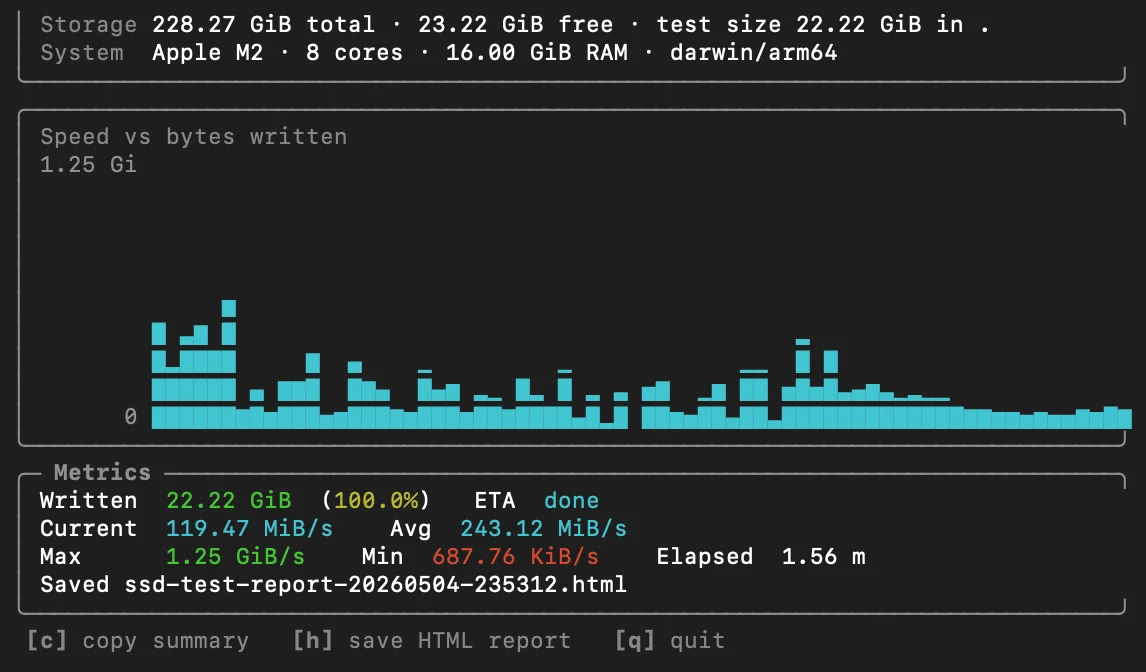
SSDs take short bursts of writes into a fast DRAM or SLC cache. Once that cache is full, the speed drops to what the flash memory can sustain, often a fraction of the advertised number. SSD Test keeps writing random data until the free space is used up and charts the speed as it goes, so you can see where the cache runs out.
Each run uses up some of the drive’s write endurance. It fills the free space (or the size you choose) with data, which counts against the SSD’s rated total writes. One run on a healthy drive is negligible; don’t run it in a loop, and avoid it on small, cheap or worn drives.
Features
- Full-screen terminal interface with a live chart and the current, average, maximum and minimum speed
- Detects the disk model, CPU, RAM and OS for the report
- Saves a self-contained HTML report or copies a Markdown summary to the clipboard;
--jsonfor scripts and CI - Updates itself from GitHub releases when run without arguments
- Go standard library only, one binary for macOS, Linux and Windows on arm64 and x86_64
- Also available as a desktop app with the same test, on the releases page
Usage
The install command above downloads the binary, caches it for 24 hours and runs it without touching your $PATH. Pipe it to INSTALL=1 sh instead to install it into ~/.local/bin.
ssd-test --path /mnt/data --size 50%
ssd-test --output report.html
--size takes auto (free space minus a reserve of 1% of the disk, at most 1 GiB), an absolute size such as 2G, or a percentage of the free space.
Support
Found a bug or have an idea? Open an issue on GitHub.